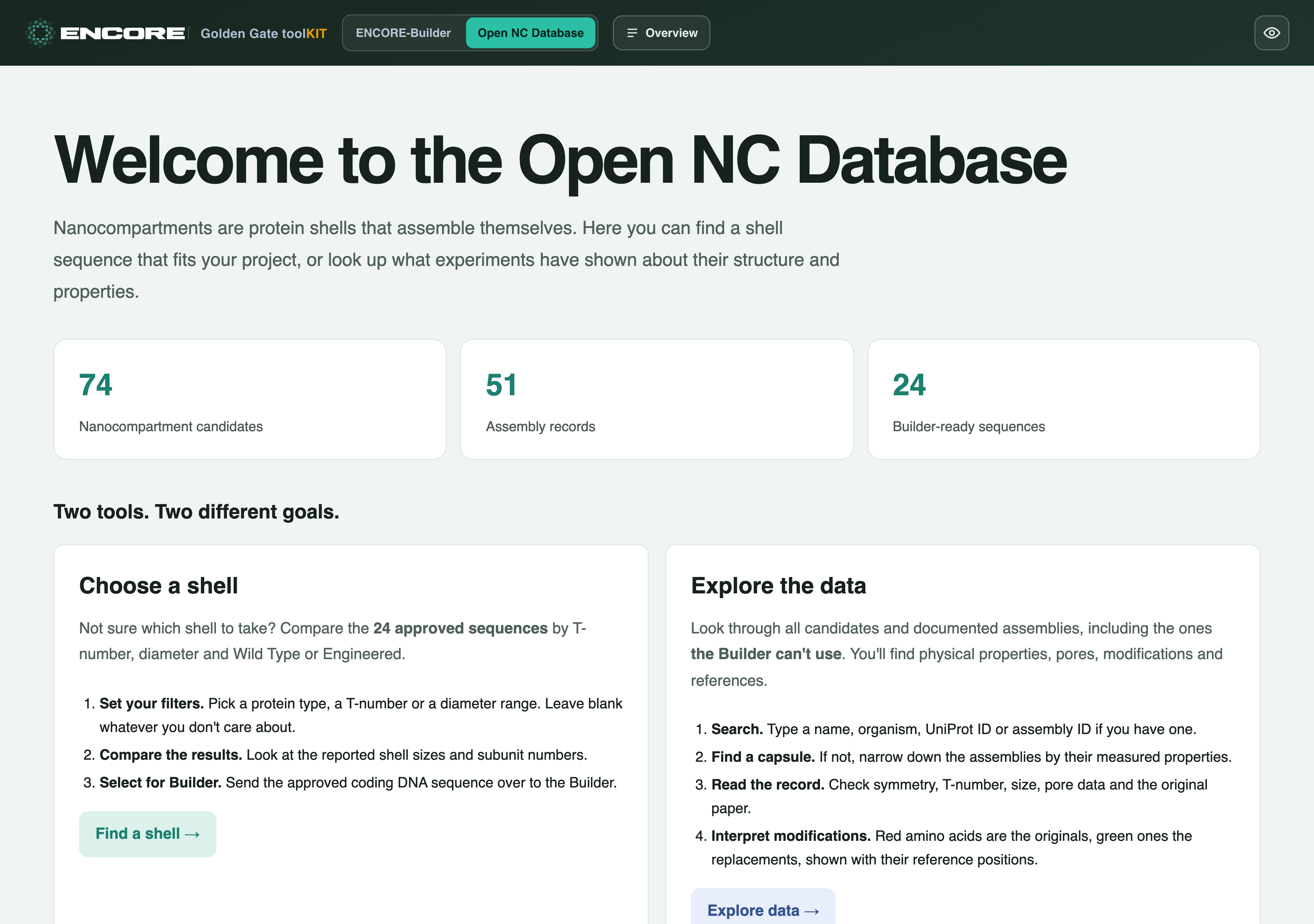
Filter the 24 reviewed shell sequences of the Open NC Database and look at their properties and targeting peptides. This demo runs in your browser and only shows the first view.
Biological Background of the Open NC Database
The biology of nanocompartments is described on other pages of this wiki, so this page only repeats what the data model of the database needs.
Encapsulins and other nanocompartments. What encapsulins are, how their shells reach three discrete sizes (T=1, T=3 and T=4) and how cargo is loaded through targeting peptides is described in What are Encapsulins? and in the Glossary. The glossary also explains the triangulation number and the vault. The vault is not an encapsulin, but the ENCORE toolKIT uses it as a shell. The database is named after nanocompartments and not only after encapsulins because it is meant to host such systems in the future.
Targeting peptides. A peptide that loads cargo into one shell does not automatically work in another one. The database therefore records the shell system for which a peptide was described and does not treat every peptide as a universal tag. See the glossary entry on the targeting peptide.
Protein, DNA and Assembly are three different Things
A coding sequence (CDS) is a nucleotide sequence that encodes a protein. Because the genetic code is redundant, different CDSs can encode the same amino-acid sequence. GAA and GAG, for example, both encode glutamic acid. Two DNA constructs can therefore give an identical shell protein although their codons differ. When the exact nucleotide sequences of a publication are not reported, the database does not assume that two constructs used different DNA.
The same shell protein can also form more than one architecture. The EncA protein of Myxococcus xanthus forms T=3 cages and, as cryo-electron microscopy has shown, T=1 cages as well1,2. Neither the length of a CDS nor the amino-acid sequence alone fixes the diameter of the particle.
Features
The Data Model
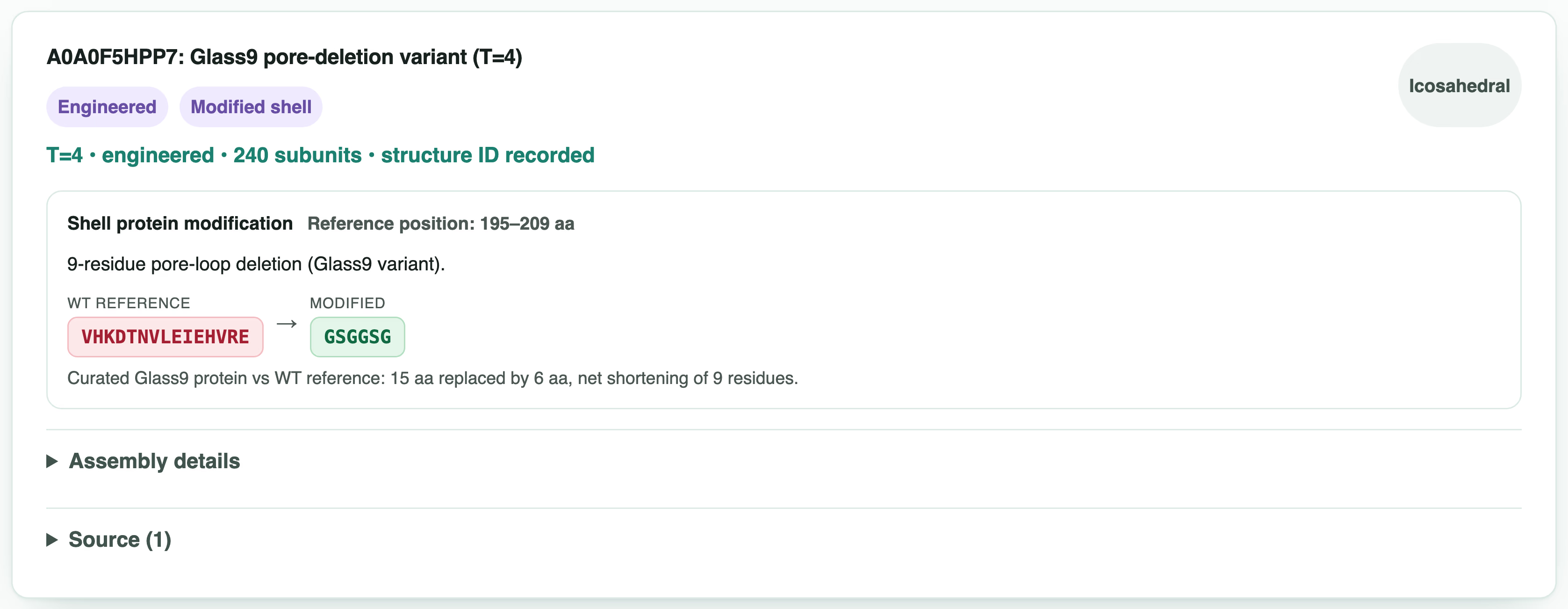
Figure 1. A modified shell in Explore the data. Red marks the original residues of the wild-type reference, green marks the replacement.
The database separates a biological candidate from an experimentally described assembly.
Candidate. A protein entry, usually identified by its UniProt accession3. It carries details such as the organism and the encapsulin family.
Assembly. A reported shell architecture or experimental state, for example a T=1 or a T=3 particle. One candidate can have several assemblies.
Pore observation. A measured pore of an assembly with its location, state, diameter, charge, dynamics and method.
Sequence record. The genomic reference sequence of a candidate, kept apart from the coding sequence that the Builder uses.
Targeting peptide. A peptide with its amino-acid sequence, the cargo it belongs to, its reported placement at the N- or C-terminus and the supporting publications.
Evidence and sources. Experimental values with their support method, DOIs and structure identifiers, which link to the Protein Data Bank4.
Read more
Where published information exists, an assembly also carries shell diameter, T-number, subunit count, experimental conditions and sources. Wild-type and engineered variants are kept apart. For a modified shell the database records where the change sits and what it is. The interface shows the original amino acids in red and the replacements in green, together with their positions in the reference protein. Architecture or cargo changes alone are not counted as mutations. "Unmodified" describes the shell protein relative to the curated reference. It does not mean that an experimental DNA construct was identical to the genomic DNA. Unknown values remain unknown. They are never read as zero and never replaced by estimates.
Two Views for two Tasks
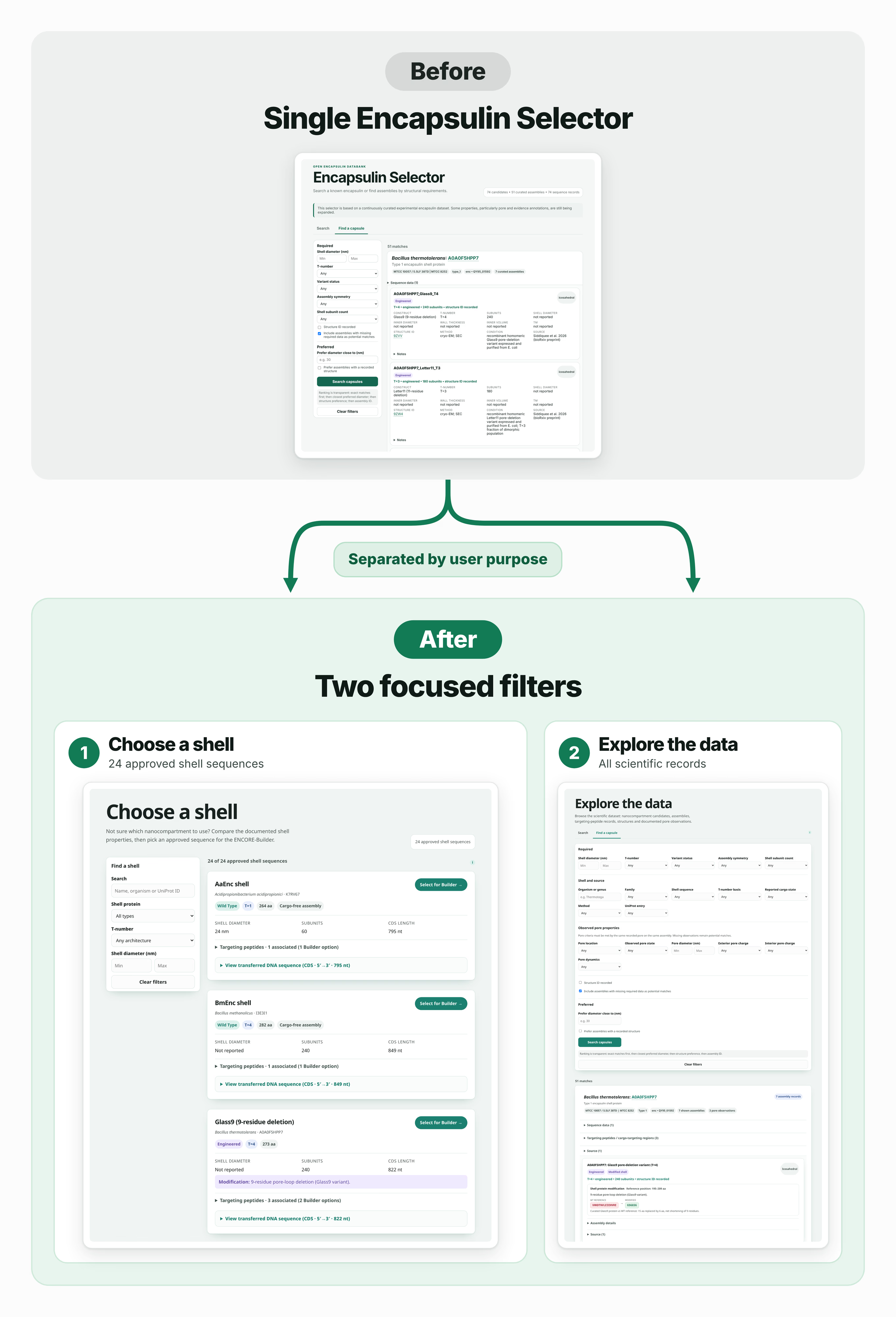
Figure 2. The two views of the database, Choose a shell and Explore the data. During development they replaced a single Encapsulin Selector, so that each view serves one task.
Both views read the same curated dataset, but they have different requirements. During development we separated them because a single interface that tried to combine detailed evidence and construct-ready selection made both harder to use.
Choose a shell
Figure 3. Choose a shell. The filter panel narrows the list by protein type, T-number and diameter. A card shows the documented modification and the associated targeting peptides.
Choose a shell is for users who do not yet know which shell to take. It shows the 24 reviewed shell coding sequences that are approved for transfer into a design. You can search by protein name, organism or identifier and narrow the list by protein type (wild type or engineered), T-number and a range of the shell diameter. Wild-type and engineered variants are marked, and a card shows the T-number, diameter, subunit count and the length of the coding sequence. For an engineered shell the card also states the documented modification.
Read more
An expandable section shows the exact coding sequence (5′ to 3′, with a copy button), so you can inspect it before you use it. The section states clearly that no cargo and no targeting peptide are part of this sequence. The label "Cargo-free assembly" appears only if the source describes the experimental preparation as empty or unloaded. A shell-only design sequence and the experimental state of a reported particle are two different things.
Select for Builder
Figure 4. Select for Builder. The button at the top right of a card hands the shell to the Builder, together with the targeting peptide options of this assembly.
Select for Builder hands the reviewed coding sequence and the targeting peptide options of exactly that assembly to the Builder. Nothing is added to the construct automatically. In the cargo module of the Builder, a suitable peptide can be chosen in Type 0.1 (C-terminal) or Type 0.5 (N-terminal), or the construct goes on without one. The reported placement is marked. The opposite terminus can be chosen, but it is labeled as an unvalidated alternative. Peptide records that exist for scientific reference only are not offered as ready-to-use parts. Shell records without an approved coding sequence stay available in Explore the data.
Explore the data
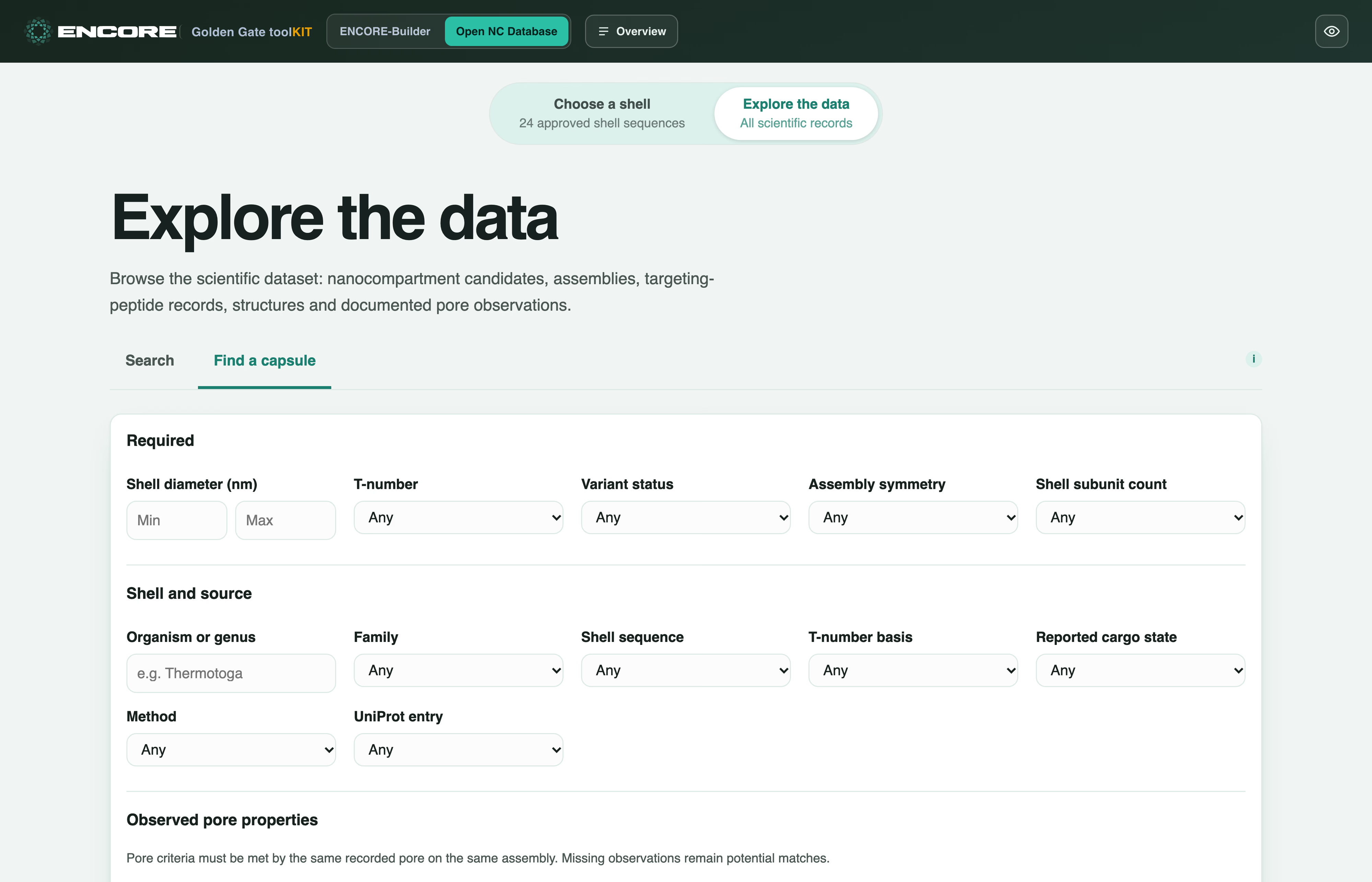
Figure 5. Explore the data. The structured search narrows down assemblies by measured properties.
Explore the data is the scientific view. It covers all candidates and assemblies, including those that are not eligible for the Builder. There are two ways in.
Read more
Search. A direct search covers accessions, organisms, proteins, genes, strains and constructs, targeting-peptide identifiers and sequences, pore identifiers and literature DOIs. The results show the candidate with its curated observations.
Find a capsule. A structured search narrows down assemblies by measured properties, namely diameter, T-number, variant status, symmetry, subunit count, organism or genus, family, shell sequence status, basis of the T-number, reported cargo state, method, UniProt entry and the structure identifier. Pore filters cover location, observed state, diameter, exterior and interior charge and pore dynamics. Records with missing data can be kept as potential matches. A preferred diameter or a recorded structure only changes the ranking and removes nothing.
Each candidate can be examined through its assemblies, pore observations, experimental conditions and references. The view is organized around candidates and assemblies, so a long list of similar sequences does not appear without context. Targeting peptides are shown in expandable sections with their amino-acid sequence, the available DNA sequence, the reported placement, the supporting publications and the assemblies they are linked to. A missing DNA sequence is never inferred from the amino acids. Research-reference motifs are kept apart from the peptides that are eligible for the Builder, so an observed binding motif is not presented as a validated design component without evidence.
This view has no transfer button on purpose. It is the place to examine evidence, including observations that do not yet support an export-ready design.
Targeting Peptides and Shell Associations
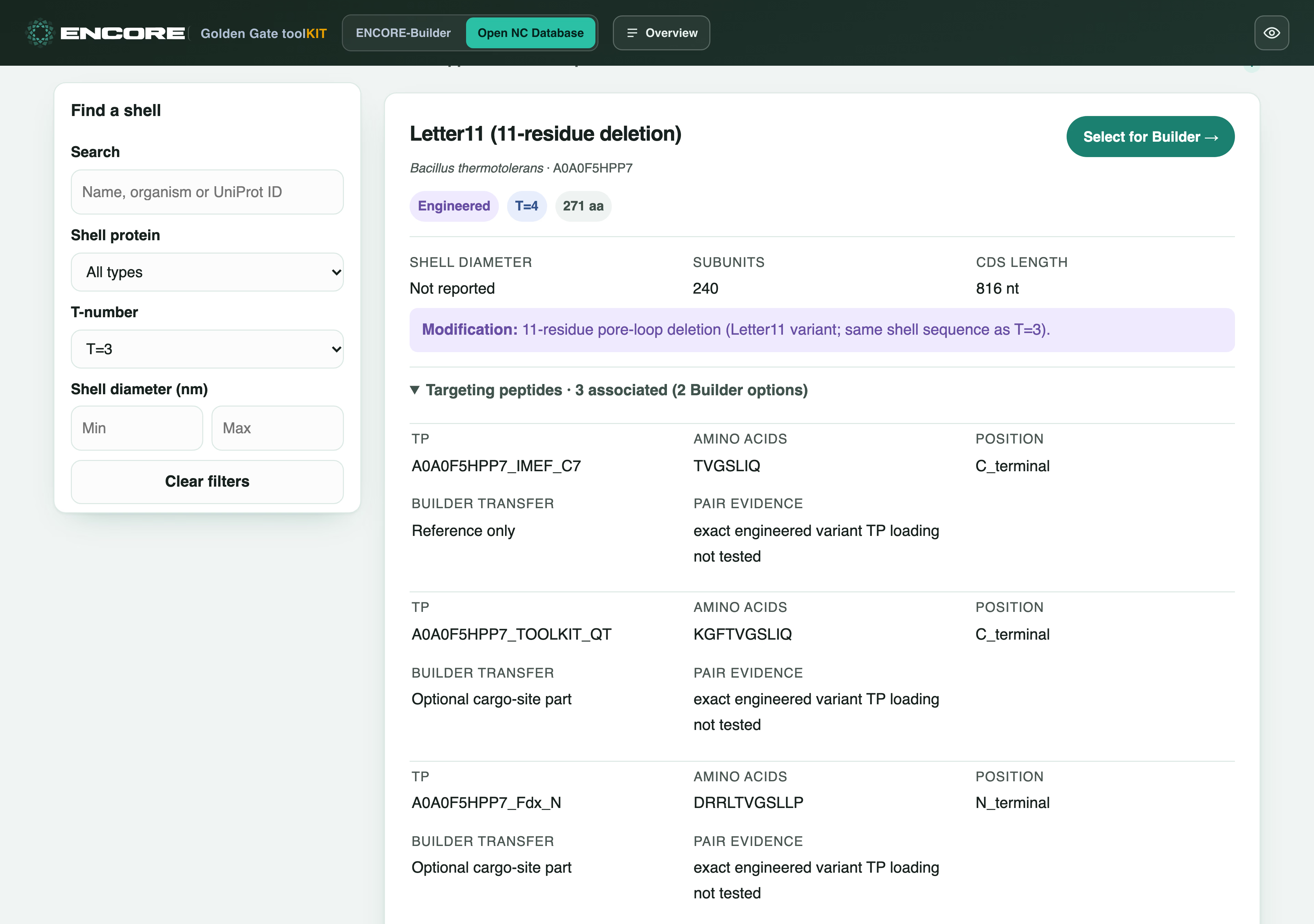
Figure 6. The targeting peptides associated with a shell. Each row shows the amino acids, the reported position, the Builder transfer and the pair evidence.
The 19 targeting-peptide records are linked to the assemblies they belong to by 50 associations. An association says that a peptide is documented for the shell system of an assembly, for example from published loading of the wild-type shell. It does not mean that all 50 combinations have been tested. Some associations describe the same encapsulin system and not the exact engineered assembly. Where the curated record holds only the amino-acid sequence of a peptide, the Builder designs a coding sequence for it, and this DNA is a designed sequence and not a reported experimental one.
Reading an Assembly Record
Figure 7. The overview page of the database with the two routes and the glossary.
The overview page of the database explains the vocabulary with a glossary of 20 terms, from "candidate" and "assembly" to "CDS", "T-number", "pore" and "DOI". It also contains a short guide to reading a record, with an example of an unmodified shell, a shell with a 3xHis modification and a non-icosahedral tetrahedral cage. Missing information has a defined meaning. "Not reported" does not mean zero, "Not verified" means that the confirmation is insufficient and "N/A" means not applicable.
How the Data are curated and published
The common source is one curated Excel workbook. An export script converts its worksheets into one JSON file per record and checks the schema, and it refuses to delete records silently. A build script prepares the JavaScript data that the web interface reads. Explore the data reads the broad collection. Choose a shell reads the reviewed sequence catalog together with the relevant assemblies and peptide associations. Because candidates, assemblies, evidence, sequences and peptide links live in one dataset, both views are updated together and are not maintained as separate databases. The dataset is also archived on Zenodo (https://zenodo.org/records/23509873).
Read more
Eligibility for the Builder is decided by a protocol. Only reviewed sequences enter the catalog, and each one has a documented translation check. No coding sequence is inferred from a protein sequence, and no sequence is approved without that check. Automated tests check the references between candidates, assemblies, pores and citations, and that the generated data file is up to date.
The workbook is available for download on the overview page. It contains a field guide and source links, so others can examine the records, check the references and reuse the tabular data independently of the interface.
Contributing
The database grows through its users. To add a new entry, you copy a template from the data folder, fill in the fields and open a pull request on GitHub. Unknown fields can stay empty. You can also open an issue with the DOI or PDB entry, the sequence or identifier and the experimental conditions. A maintainer reviews every contribution scientifically before it is included, and the instructions are in the README of the data folder.
Interface and Availability
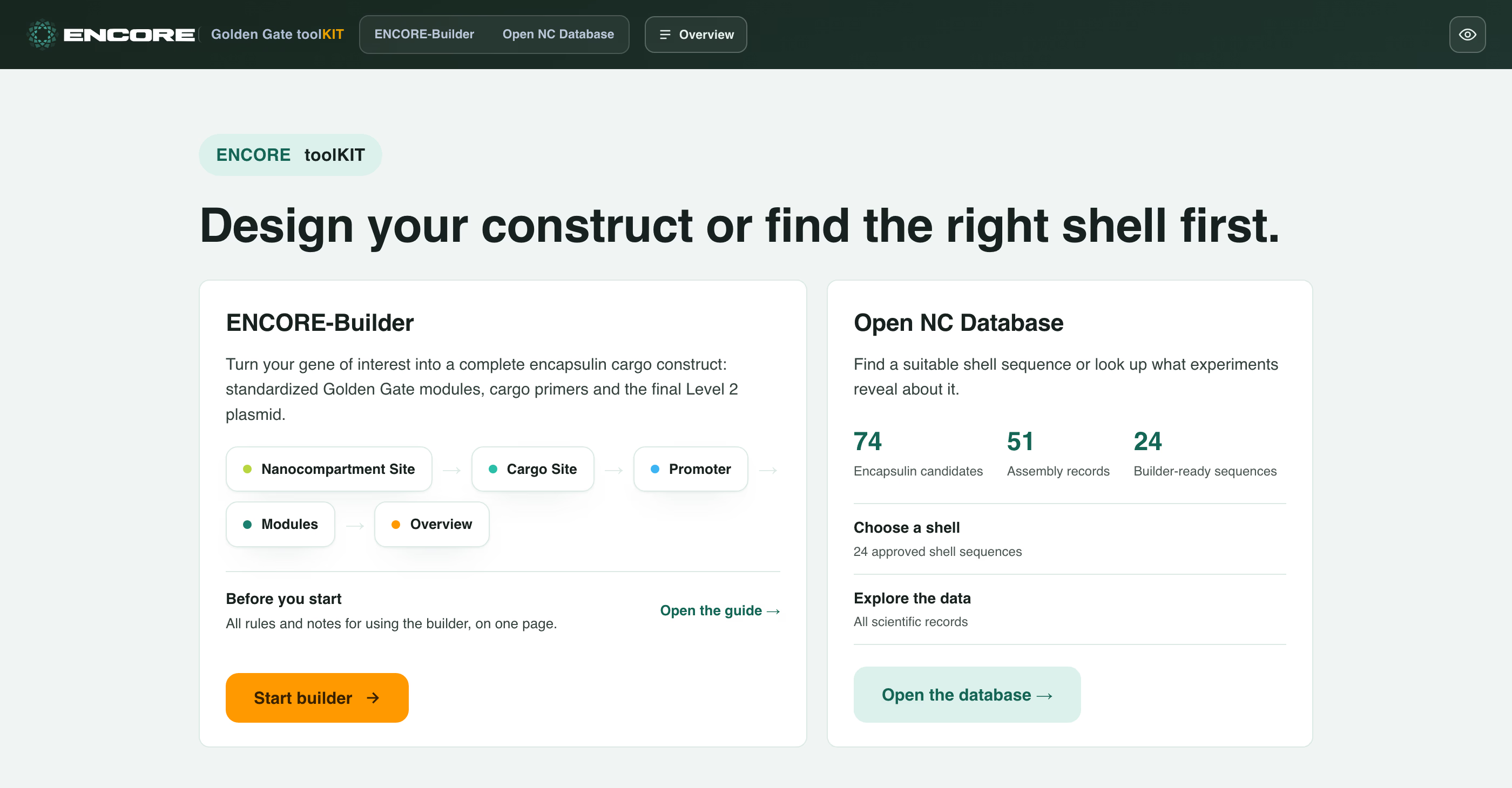
Figure 8. The start page of the software. The Builder and the Open NC Database run in the same local installation.
The database runs inside the same local installation as the ENCORE-Builder. After the first start the pages work without an internet connection, only the links to external resources such as UniProt or the Protein Data Bank need one. The interface is available in English, Spanish, German, French, Mandarin, Russian, Portuguese and Arabic (right to left), with a dark mode and a dyslexia-friendly font. The scientific records are not translated and stay in English.
Using the Open NC Database
The instructions for using the Open NC Database are part of the software itself. The overview page of the database explains the two views, shows how to read a record and has a glossary of the terms. The information windows behind the small "i" symbols explain the filters of Choose a shell and Explore the data. The database is part of the same installation as the ENCORE-Builder and is available on Docker Hub. The step-by-step guide to install and start it is in the README of our GitHub repository (https://github.com/iGEM-KIT/ENCORE-Builder) and of our GitLab repository (https://gitlab.igem.org/2026/software/kit/encore-software).
Scope and Limitations
The database is a curated literature resource and not a substitute for experimental validation. Measurements that come from different conditions, structural methods and constructs cannot always be compared directly. Some pore characteristics and source details are still unreported or under review, and individual claims should be checked against the cited publications. When a measurement comes from a cargo-loaded shell, an engineered variant or an unusual assembly, we document this and do not assume that the same properties hold for the wild-type shell.
A shell sequence that is marked as eligible for the Builder has passed our current sequence-level review. This does not show successful expression, cargo encapsulation, pore performance or the expected particle geometry in a new host. Peptide associations are not an experimental validation of every combination of shell and peptide. Placing a peptide at a different terminus than the one documented is a design choice and not a validated result. T-number and diameter describe assemblies that were reported in experiments, so using the same coding sequence does not guarantee the same shell in another experiment. These data support an informed choice, and they do not predict the outcome of a new experiment.
By making both the interface and the data available, we hope to shorten the search for a suitable shell and to make the reasoning behind a choice easier to examine and to repeat. The Builder, which continues from the chosen shell, is described on its own page.
McHugh CA, Fontana J, Nemecek D, Cheng N, Aksyuk AA, Heymann JB, Winkler DC, Lam AS, Wall JS, Steven AC, Hoiczyk E (2014). A virus capsid-like nanocompartment that stores iron and protects bacteria from oxidative stress. The EMBO Journal 33, 1896 to 1911. https://doi.org/10.15252/embj.201488566
Eren E, Wang B, Winkler DC, Watts NR, Steven AC, Wingfield PT (2022). Structural characterization of the Myxococcus xanthus encapsulin and ferritin-like cargo system gives insight into its iron storage mechanism. Structure 30, 551 to 563. https://doi.org/10.1016/j.str.2022.01.008
The UniProt Consortium (2023). UniProt: the Universal Protein Knowledgebase in 2023. Nucleic Acids Research 51, D523 to D531. https://doi.org/10.1093/nar/gkac1052
Berman HM, Westbrook J, Feng Z, Gilliland G, Bhat TN, Weissig H, Shindyalov IN, Bourne PE (2000). The Protein Data Bank. Nucleic Acids Research 28, 235 to 242. https://doi.org/10.1093/nar/28.1.235